



|
Getting your Trinity Audio player ready...
|
DriveNets Back-to-Back architecture is built for exactly that space. It connects two whiteboxes directly to each other and makes them behave as one router, with a single control and management plane and no fabric switch in between.
Simple design. Clear fit. Blog done 😊
Well, almost. If you want to understand how it actually works and why it fits this part of the network so well, keep reading.
When Standalone is not Enough, and a Cluster Is Too Much
Standalone breaks down in two situations.
- Port density: Once a site outgrows one whitebox, adding a second standalone solves the port problem but doubles the operational footprint. This means managing two control planes, two sets of IGP adjacencies, and two devices in the NMS. At scale, that becomes a real operational headache.
- Control plane redundancy: cyber-attacks, maintenance windows, software upgrades, malformed packets, or memory leaks can all take down the control plane. A single standalone has no protection against them, and SPs prefer control plane redundancy, not just data plane redundancy.
A full chassis or Clos cluster solves both problems, but the added components carry capital and operational overhead that do not make sense at aggregation and edge scale.
DriveNets Back-to-Back architecture is the configuration that fits in between.
What is Back-to-Back?
To understand back-to-back, we need to start with DriveNets Distributed Disaggregated Chassis (DDC). DDC is an open alternative to a traditional chassis. It breaks the chassis into a cluster of standard whiteboxes and lets you operate them as a single router via one CLI. DDC works well at large scales, but for many telcos’ aggregation and edge domains, a full cluster is more than most sites need.
Back-to-back takes that same principle and strips it down. Two Network Cloud Packet Forwarder (NCP) whiteboxes connect directly to each other through their fabric ports, using DACs or optics with no extra fabric switch in between.
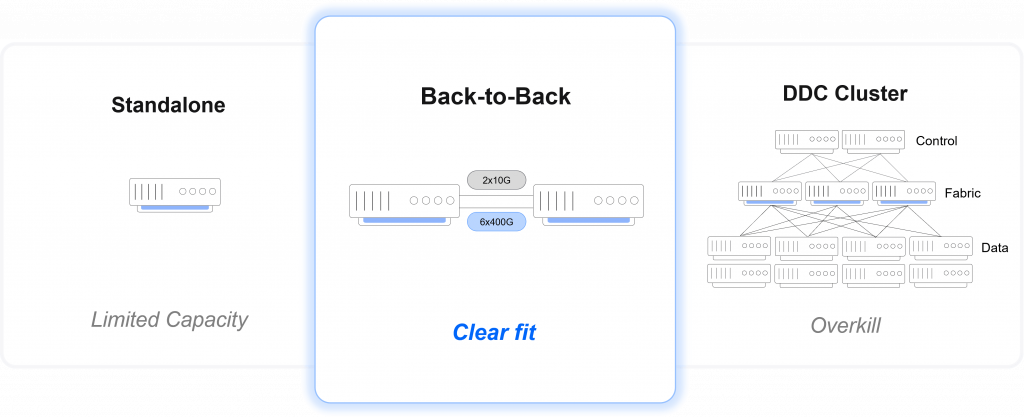
Back-to-Back is where most real deployments live
The ingress NCP tags the packet with its destination NCP and sends it across the back-to-back link. The destination NCP then forwards it to the egress port with no fabric box to provision.
The result is one logical router built from two physical white boxes. This gives you one control plane, one management entity, and one software image.
Reference Configuration
The Back-to-Back configuration runs on two DriveNets NCP nodes, based on the Broadcom J2C. The pair delivers:
- 128 ports at 1, 10, or 25 Gbps
- 24 ports at 100 Gbps
- 6 x 400 Gbps fabric ports per node, used for the back-to-back interconnect
- Control plane redundancy
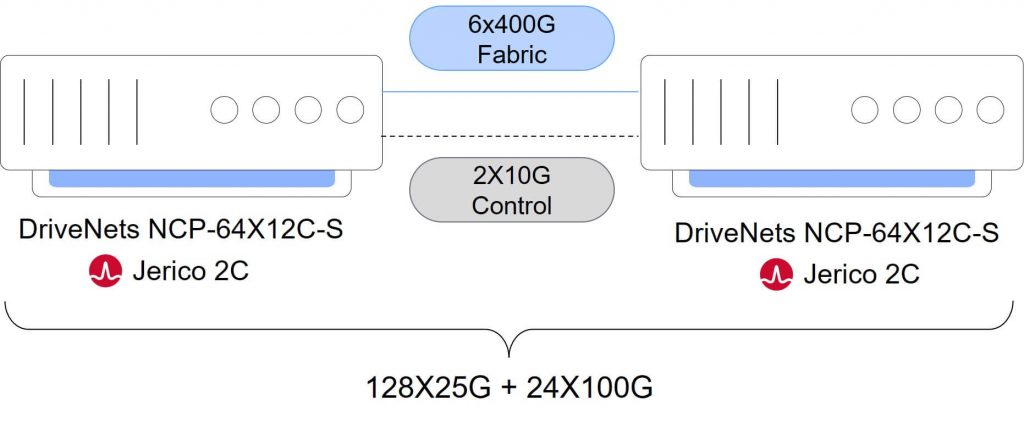
DriveNets Back2Back – Single routing entity with control plane redundancy
There is no separate control hardware. The control plane runs on the NCP nodes in an active-standby configuration and switchover happens through the control ports. The architecture is hardware-agnostic and can be ported to other more capable NCP whiteboxes if needed.
Key Benefits of DriveNets Back-to-Back
- One NOS, every service
The DriveNets network operating system (DNOS) that runs on the Back-to-Back is the same across all deployment types. This means the software supports whatever service mix the site needs, whether it is business, residential, or mobile. There is no feature gap to plan around. Whatever runs on DDC Cluster runs on a Back-to-Back. It also means the site can evolve. You can start with a single standalone box, add a second whitebox later, and convert to back-to-back without changing software stacks or network configurations. If you outgrow back-to-back and graduate to a full cluster by adding Network Cloud Fabric (NCF) nodes, the investment carries forward.
- Control plane redundancy, built in
The Active-Standby control model addresses the control plane failure modes that telcos actually ask about. If the active NCP controller takes a hit from software error, attack, or anything else, the standby takes over with sub-50 ms traffic convergence. Data plane redundancy is also possible by dual-homing customer ports across both whiteboxes.
- One CLI
A back-to-back pair looks like one router to BGP, to your IGP, to your orchestrator, and to your NOC. The alternative option of two standalones means twice as many devices to operate and in scale it’s a toll.
Load balancing across uplinks is also simpler. A Link Aggregation Group (LAG) inside one logical box splits traffic across the uplink ports automatically. With two standalones, that same job becomes IGP metric tuning across two separate routing entities.
- Small Footprint
Back-to-back is not a chassis, DDC cluster or a Clos topology. Back-to-Back is great for those remote sites where rack space, power, and operating costs matter and traditional solutions are overkill.
Built to Fit, Not to Compromise
Since its start in 2016, DriveNets has evolved its solutions to solve real customer challenges. Just like pursuing disaggregation, converged networking, and multiplane architecture, we are now pursuing another gap to close. The Back-to-Back architecture is designed for aggregation, edge, pre-aggregation, and peering sites that have outgrown a single standalone router but do not need a full cluster. It fits remote locations where a small footprint matters, or sites that terminate high-capacity links that require control plane redundancy. This setup is not a limited workaround. It runs the full DriveNets software stack and supports all services. If your sites have grown past standalone but do not justify a full cluster, Back-to-Back fills that gap.
Frequently Asked Questions
What is DriveNets Back-to-Back architecture?
DriveNets Back-to-Back architecture is a two-whitebox router design for aggregation and edge sites that have outgrown standalone routers but do not need a full DDC cluster. Two NCP whiteboxes connect directly through fabric ports using DACs or optics, operating as one logical router with one control plane, one management entity, and one software image.
What capacity does the DriveNets Back-to-Back reference configuration support?
The reference Back-to-Back configuration runs on two DriveNets NCP nodes based on Broadcom J2C. The pair delivers 128 ports at 1, 10, or 25 Gbps, 24 ports at 100 Gbps, and six 400 Gbps fabric ports per node for the direct back-to-back interconnect.
How does DriveNets Back-to-Back provide control plane redundancy?
Back-to-Back provides control plane redundancy through an active-standby model running directly on the NCP nodes. There is no separate control hardware, and switchover happens through the control ports. If the active NCP controller fails, the standby takes over with sub-50 ms traffic convergence.
Related content for Service Provider infrastructure
DriveNets Service Provider Networking Solution
Latest Resources on Service Provider Networking: Videos, White Papers, etc
Recent Service Provider Networking blog posts from DriveNets AI networking infrastructure experts
White Paper
The Four Dimensions of Network Convergence